
Reviews
Beach Sand Art Creator offers a uniquely calming creative outlet. The realistic sand simulation is impressive, making every stroke feel natural. Customizing the colors and adding shells or footprints adds depth to each piece. The shake-to-erase feature is clever and keeps the process flowing. Perfect for unwinding or making quick, shareable art.
Description
Game Introduction
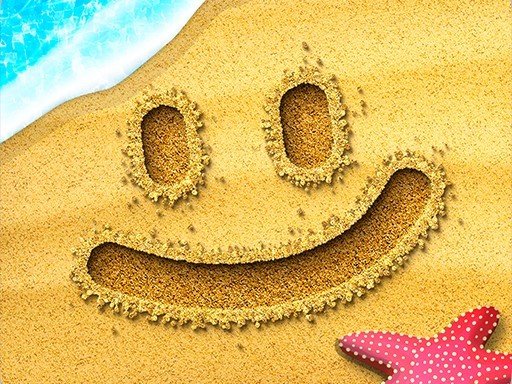
Beach Sand Art Creator is a free online activity that invites users to craft visual pieces on a simulated shoreline. The core appeal lies in its realistic sand simulation, where each stroke moves the granules naturally, mimicking the feel of drawing on an actual beach. This platform is designed for anyone seeking a calm, imaginative outlet. Users can produce anything from basic shapes to elaborate patterns without needing prior artistic training. The environment is fully customizable, allowing adjustments to the hues of the sea, sky, and sand, as well as the texture of the ground. Additional natural elements like shells, seaweed, pebbles, and footprints can be placed to enrich the scene. This makes it suitable for sending personalized messages, playing simple games like Tic-Tac-Toe, or just doodling for relaxation. The ability to shake the device to let virtual waves erase the canvas provides a quick way to start anew. Finished pieces can be saved to a local gallery or shared via social media or email, making it a versatile tool for both personal enjoyment and social connection.
How to Play
To begin, open the application on your device to reveal a digital beach scene. Players typically use their finger or a stylus to draw directly on the sand, which responds with realistic movement and shaping. To clear the canvas, a simple shake of the device triggers a wave animation that washes the sand clean. The background can be altered by tapping on the sea, sky, or sand areas to select different colors from a palette. Decorative items such as shells, pebbles, or footprints are added by choosing them from an on-screen menu. Various sand textures can be selected to give the artwork a unique feel. Once a creation is complete, it can be saved to the device's gallery or shared with others. The controls are straightforward, requiring no complex instructions, making it accessible for all ages.
Game Features
This application offers a creative and relaxing experience with a realistic sand simulation. Users can customize the colors of the sea, sky, and sand, as well as the texture of the sand itself. A variety of decorative elements like shells, seaweed, pebbles, and footprints may be added to enhance the artwork. The shake-to-erase feature provides a quick way to reset the canvas. Finished pieces can be saved to a local gallery or shared on social media and via email. The interface is designed for ease of use, with no complicated controls required.
Tips for Success
Experiment with different drawing tools and sand textures to discover your preferred style. Use the shake-to-erase feature to quickly start over without losing your creative flow. Try combining shells, pebbles, and footprints to add depth to your beach scenes. Practice drawing simple shapes first to get comfortable with the sand simulation. Save your favorite creations to build a gallery of your artwork over time.






Comments
Sign in to comment
You must be logged in before posting a review or rating.
No account? Create one
No comments yet. Be the first to comment!