
Reviews
Orbital Station Alignment strips away unnecessary elements to deliver a pure test of precision. The control scheme feels responsive without being twitchy, and the lack of a timer removes pressure. Each successful connection brings a genuine sense of accomplishment. The minimal visual design helps maintain concentration. It is an ideal choice for players who enjoy skill-based challenges without complex rules or time constraints.
Description
Core Objective
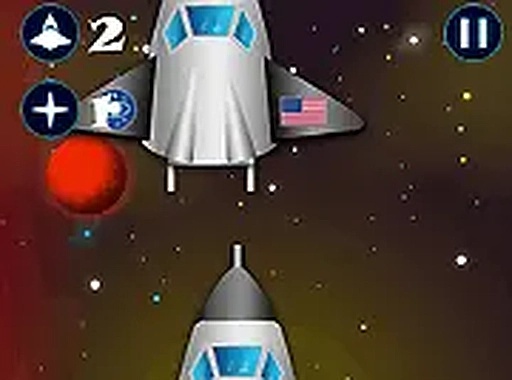
In Orbital Station Alignment, players take on the role of a spacecraft pilot. The primary task involves guiding the vessel toward a designated station and achieving a secure connection. Success depends on maintaining a steady approach speed and a proper angle. The game strips away complex narratives, focusing entirely on the moment-to-moment decisions required for a successful link-up.
Control Mechanics
The game uses keyboard or mouse inputs to manage the spacecraft's thrust and rotation. Players must learn to apply gentle corrections rather than abrupt movements. Overcorrecting often leads to drifting away from the target. The control scheme rewards patience and a light touch, making each attempt a lesson in fine motor coordination.
Visual Presentation
The visual style keeps the screen uncluttered, with the spacecraft, station, and a simple starfield as the main elements. This minimal approach helps players concentrate on the alignment process without distractions. A full-screen mode is available to deepen immersion and reduce peripheral visual noise.
Session Structure
Each play session consists of repeated attempts to achieve a perfect connection. There is no time limit, allowing players to proceed at their own pace. The game does not include levels or progressive difficulty in the traditional sense. Instead, the challenge comes from self-improvement—each successful docking feels earned through practice and refined technique.
Accessibility
Orbital Station Alignment runs entirely in a web browser and requires no downloads or installations. It is designed for desktop computers and works best with a keyboard or mouse. The free-to-play model means there are no barriers to starting a session. This straightforward access makes it easy for anyone to try a few rounds whenever they have a spare moment.



Comments
Sign in to comment
You must be logged in before posting a review or rating.
No account? Create one
No comments yet. Be the first to comment!